



Unlock Amazon’s full potential and turn your Seller Central account into a powerful revenue engine with proven strategies for visibility, conversions, and growth.
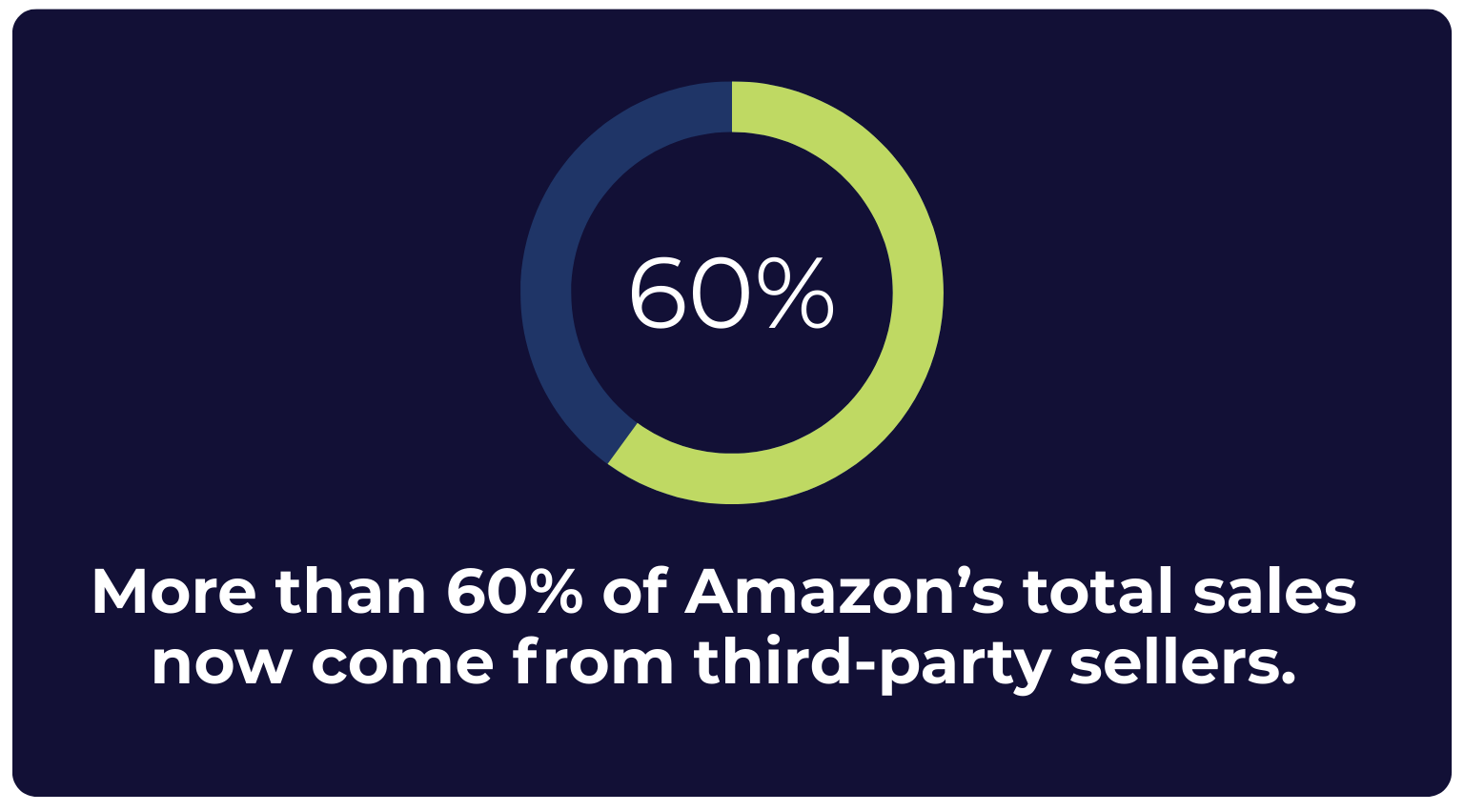
More than 60% of Amazon’s total sales now come from third-party sellers, and that number keeps rising year after year, according to Statista.
But just signing up isn’t enough. Amazon Seller Central may be your ticket to the world’s largest e-commerce audience, but turning it into a profitable, scalable business takes strategy.
This guide breaks down exactly how to succeed on Amazon Seller Central, including setup, optimization, fulfillment, advertising, analytics, and more.
Let’s turn your Amazon store into a revenue-driving machine.
Table of Contents
- What Is Amazon Seller Central?
- Quick Definitions: Amazon Seller Central Terminology
- Why Use Amazon Seller Central? Benefits for Brands and Sellers
- Who Should Use Amazon Seller Central?
- How to Register and Set Up Your Amazon Seller Central Account
- How to Navigate Amazon Seller Central
- How to Create Amazon Seller Central Product Listings That Convert
- How to Optimize Amazon Listings for Voice Search
- Inventory and Fulfillment: Choosing Between FBA, FBM, and SFP
- How to Create a Shipping Plan in Seller Central
- How to Monitor Seller Central Performance and Account Health
- Quick Seller Central Performance Audit Checklist
- Advertising on Amazon: Sponsored Ads, Deals, Experiments, and DSP
- Amazon Seller Central Analytics and Reporting
- How to Handle Customer Service and Communication
- How Play by Amazon’s Rules and Stay Compliant
- Selling Internationally With Amazon Global Selling
- Amazon Seller Central Frequently Asked Questions
What Is Amazon Seller Central?
Amazon Seller Central is Amazon’s self-service platform for third-party sellers. It enables brands, manufacturers, and resellers to list, manage, and sell their products directly to customers on Amazon’s global marketplace.
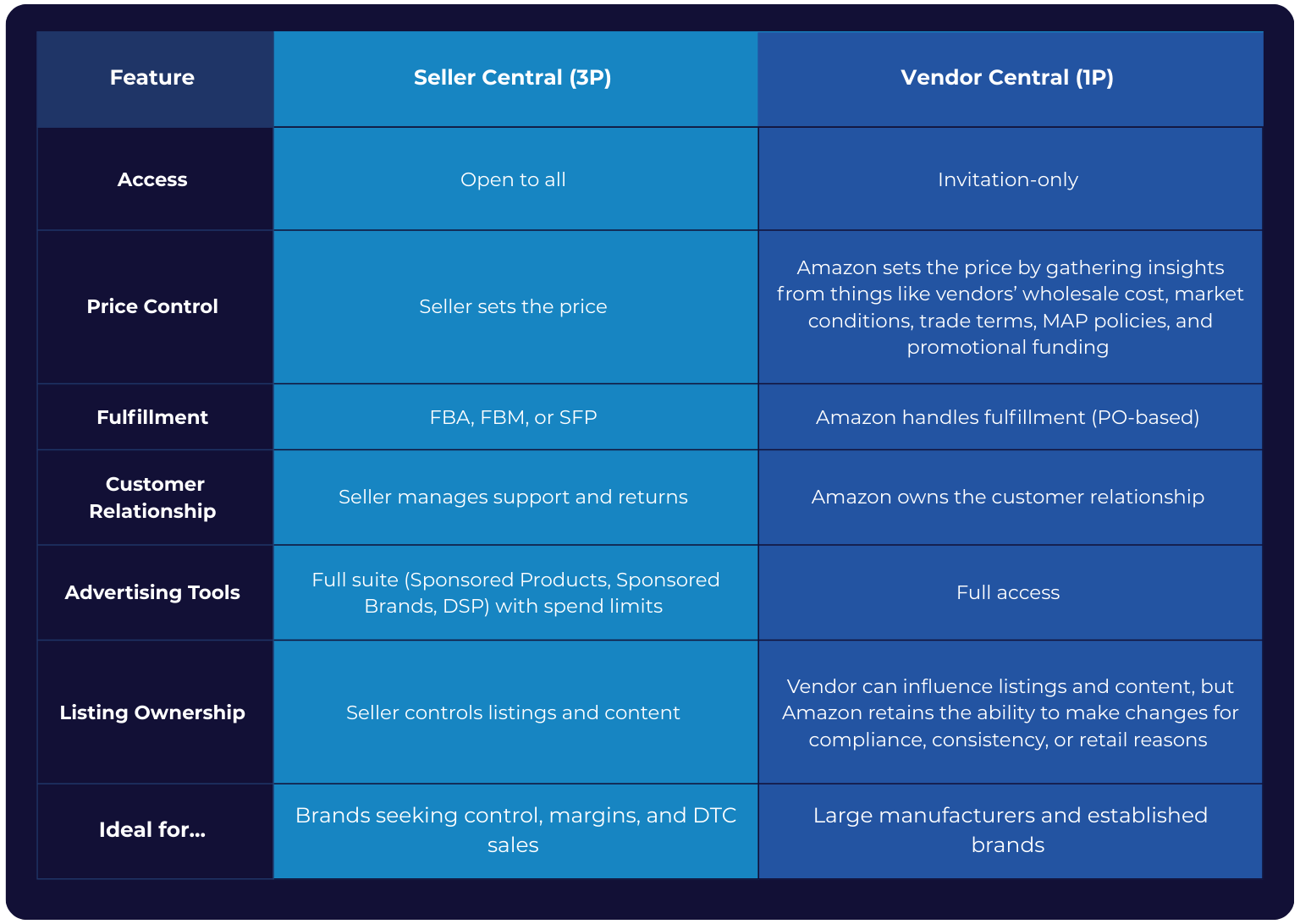
Unlike Vendor Central (Amazon’s 1P platform), Seller Central gives sellers full control over pricing, branding, fulfillment, and customer relationships.
Amazon Seller Central vs. Amazon Vendor Central
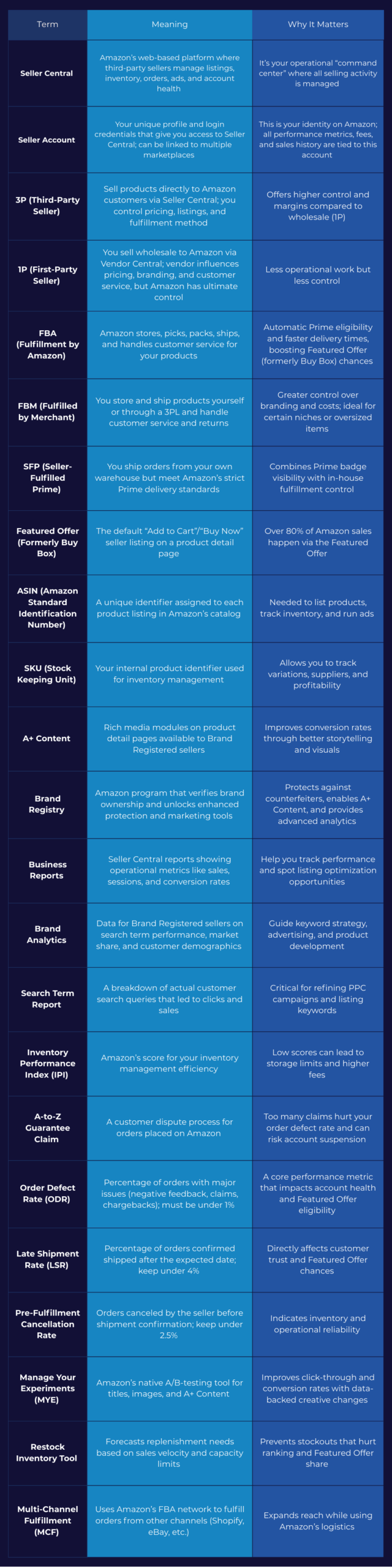
Quick Definitions: Amazon Seller Central Terminology
Before we dive into the benefits of Amazon Seller Central and how you can be successful on the platform, let’s touch on a handful of key terms so we can make sure we’re on the same page.
Why Use Amazon Seller Central? Benefits for Brands and Sellers
Amazon Seller Central is your command center for building a high-margin, brand-owned business on the world’s largest online marketplace. Here’s why thousands of sellers choose the 3P route over traditional retail and wholesale models:
Full Direct-to-Consumer Control
With Seller Central, you’re the one in charge. Set your own prices, craft compelling listings, and control every customer interaction.
This makes Seller Central ideal for brands that care about:
- Margin protection.
- Custom packaging and inserts.
- Post-purchase engagement.
- Long-term customer loyalty.
Prime Eligibility That Boosts Conversions
Selling through FBA or qualifying for Seller Fulfilled Prime (SFP) allows your products to carry the coveted Prime badge. And this isn’t just cosmetic. Prime eligibility dramatically increases visibility and purchase likelihood.
The average Amazon Prime member in the U.S. spent approximately $1,170 on Amazon purchases in 2024. That’s over twice the $570 annual spend of non‑Prime shoppers. And this 2:1 spending ratio has been remarkably consistent over the past five years.
Featured Offer Access and Competitive Advantage
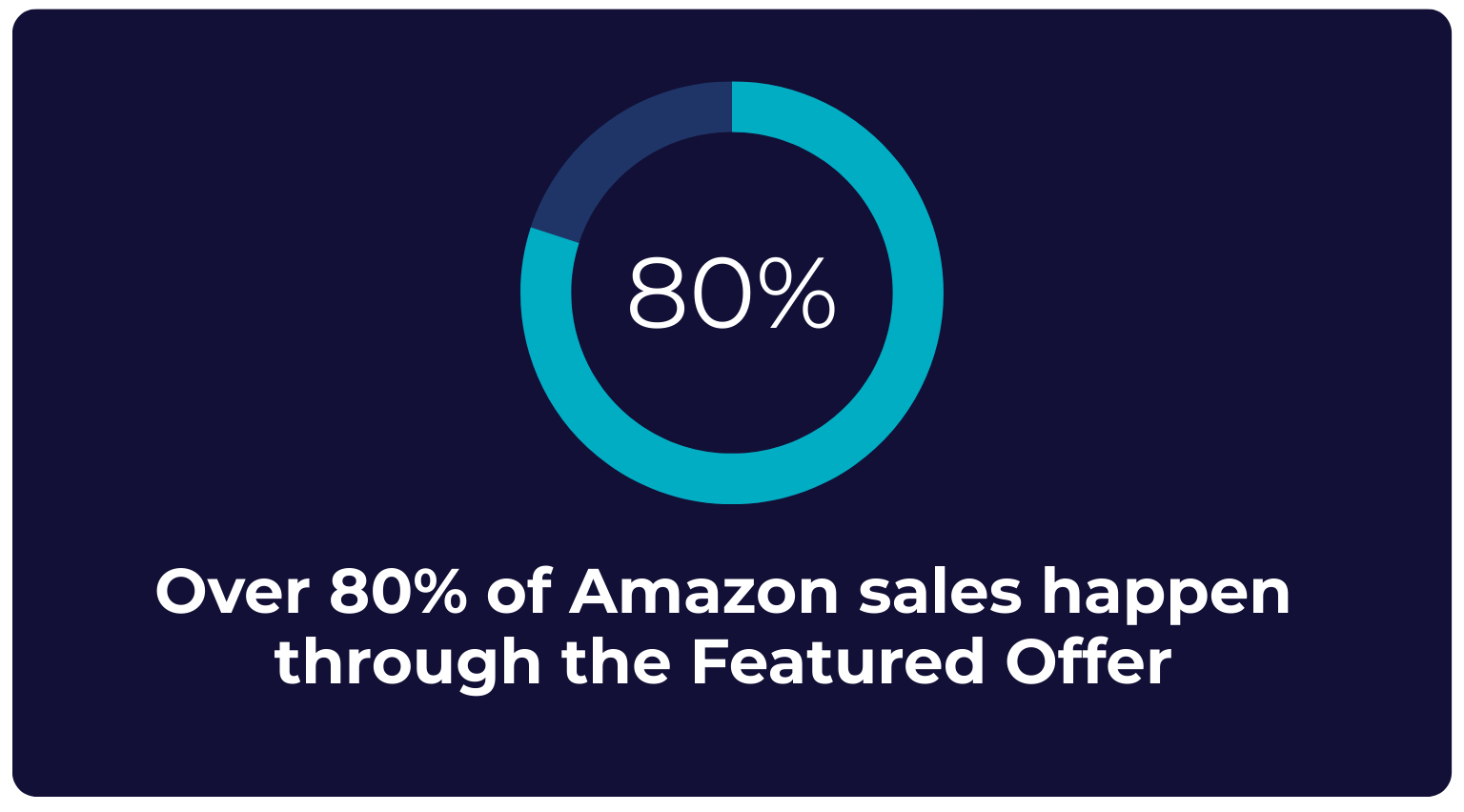
Over 80% of Amazon sales happen through the Featured Offer (formerly Buy Box), and Seller Central gives you a real shot at winning it. You control the levers that matter most, such as pricing, fulfillment speed, and seller performance. Optimize these and you increase your chances of capturing:
- Higher click-through rates.
- Conversions from mobile and voice searches.
- Visibility across Sponsored Product placements.
For resellers, maintaining price competitiveness and shipping reliability is critical. For brand owners, FBA and strong Account Health often translates to consistent Featured Offer wins.
Scalable Global Infrastructure
Amazon’s backend is your logistics engine. With Seller Central, you get access to:
- Global marketplaces (via Amazon Global Selling).
- Warehousing and shipping through Fulfillment by Amazon (FBA).
- Multichannel order fulfillment via Amazon Multi-Channel Fulfillment (MCF).
Whether you’re expanding to Europe, Japan, or Canada, Seller Central simplifies international growth while preserving brand control, no separate storefront or distributor relationships needed.
Real-Time Data, Deeper Insights
Your seller dashboard is packed with tools that go beyond vanity metrics. With Business Reports, Brand Analytics, Product Opportunity Explorer, and Search Term Reports, you gain visibility into:
- Keyword performance.
- Customer purchase behavior.
- Competitive benchmarks.
- Inventory planning and restock cycles.
These insights fuel smarter decisions across product development, ad spend, and listing optimization. Top brands leverage this data to launch faster, optimize pricing, and stay ahead of market shifts.
Who Should Use Amazon Seller Central?
Whether you’re launching your first product or managing a multinational e-commerce operation, Amazon Seller Central offers a flexible, scalable way to grow your business. Here’s how different types of sellers can use the platform to their strategic advantage:
Private Label Brands
If you’re building a proprietary product line, Seller Central is your best route to brand ownership. With FBA, you unlock Prime shipping benefits and access to Amazon’s world-class fulfillment. Combine that with A+ Content and Brand Registry, and you can:
- Craft rich, conversion-optimized product pages.
- Protect your listings from hijackers.
- Strengthen your brand story with visuals and infographics.
- Boost organic rankings with enhanced keyword optimization.
Ideal for: Startups, DTC brands, and Amazon-native products.
Wholesalers and Resellers
As a reseller, success comes down to speed and strategy. Amazon Seller Central lets you:
- Sell across multiple brands and ASINs.
- Use automated repricing tools to stay competitive.
- Win the Featured Offer by optimizing fulfillment and customer metrics.
- Manage inventory efficiently across product categories.
Ideal for: Authorized resellers, retail arbitrage sellers, and distributors.
Direct-to-Consumer (DTC) Manufacturers
For manufacturers looking to break into retail or shift from wholesale to direct sales, Seller Central offers full control over:
- Pricing and profitability.
- Branding and packaging.
- Fulfillment strategy (FBA, Fulfilled by Merchant (FBM), or hybrid).
- Customer engagement and loyalty building.
Plus, you’re no longer dependent on fluctuating purchase order volume from Amazon as a 1P vendor. You create your own demand curve.
Ideal for: Original equipment manufacturers (OEMs), consumer packaged goods (CPG) brands, and niche manufacturers entering e-commerce.
First-Time Amazon Sellers
Seller Central offers a relatively frictionless launchpad for entrepreneurs and small businesses. With tools like Seller University, Amazon Seller Mobile App, and intuitive dashboard analytics, you can:
- List products quickly.
- Access millions of shoppers instantly.
- Test product-market fit with low upfront investment.
- Learn as you grow using real-time data.
Ideal for: Solo founders, side hustlers, and Etsy or Shopify sellers expanding to Amazon.
Are you a first-time seller? Beyond Seller University, many beginners can accelerate their learning by tapping into communities like Reddit’s r/AmazonSellerForum, Facebook seller groups, and Amazon’s own seller forums. These platforms are invaluable for troubleshooting, learning from peers, and staying ahead of policy changes in real time.
Enterprise and Hybrid Sellers
Large brands often start with Amazon Vendor Central (which is invite-only), but many are now shifting to a hybrid approach that blends that 1P distribution with 3P control via Seller Central. This model enables:
- Diversified revenue streams.
- Greater pricing and brand control.
- Flexibility in responding to inventory or demand fluctuations.
- A testbed for launching new SKUs with direct oversight.
Ideal for: National brands, legacy manufacturers, and omni-channel retailers.
International Sellers
Through the Amazon Global Selling program, Seller Central makes it easier than ever to expand into the U.S. and other international marketplaces. Sellers can:
- Access fulfillment via Amazon’s global FBA network.
- Localize listings for each region.
- Manage tax and currency considerations via Amazon tools.
- Tap into high-volume markets without setting up a local entity.
Ideal for: Cross-border e-commerce brands, Asia-based exporters, and EU merchants targeting the U.S.
How to Register and Set Up Your Amazon Seller Central Account
Getting started on Amazon Seller Central isn’t just about filling out forms; it’s about laying the legal, financial, and brand foundations for long-term success. Here’s the step-by-step process you need to follow, plus tips that can save you time and headaches later.
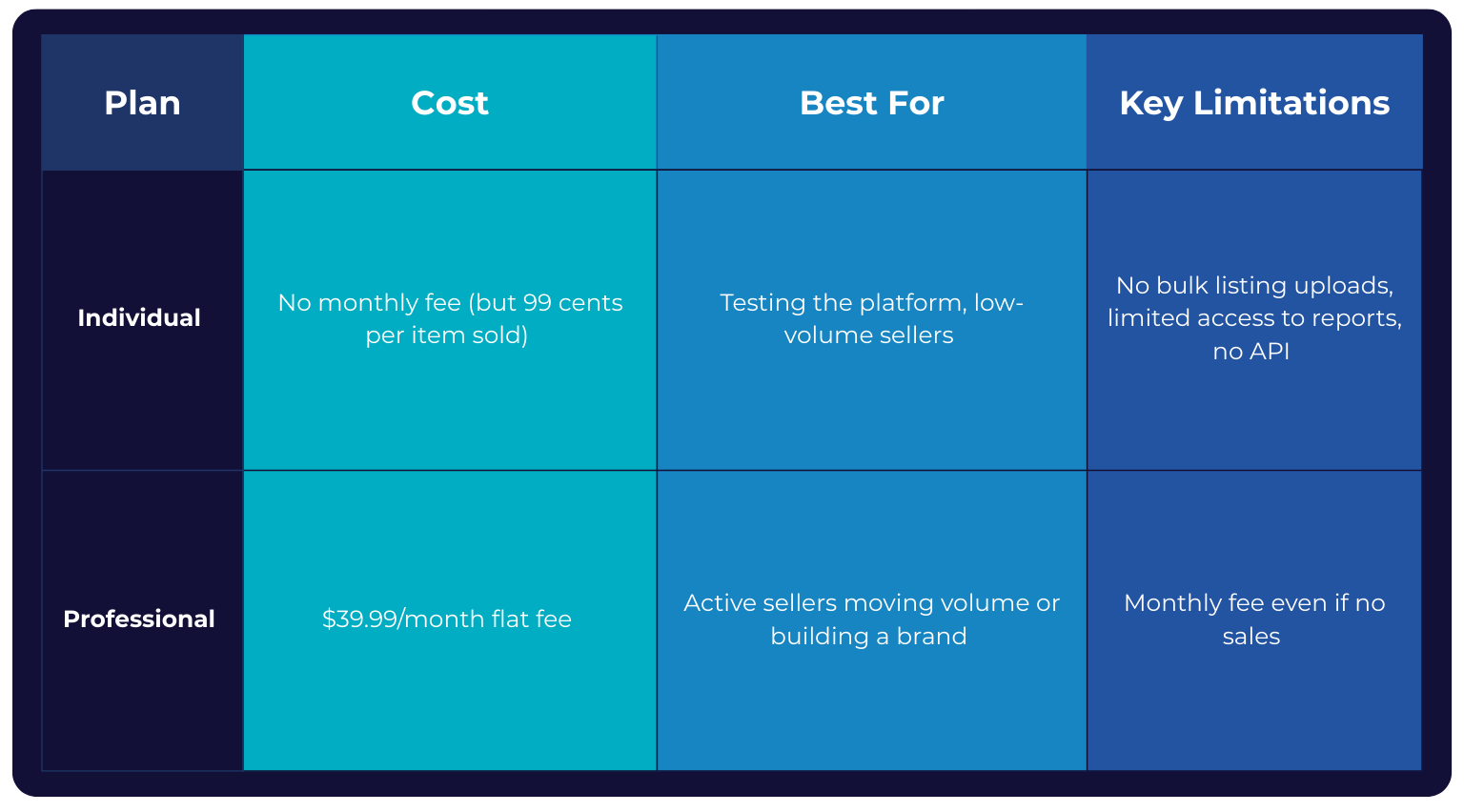
1. Choose Your Selling Plan: Individual vs. Professional
Amazon offers two account types, and your choice affects costs, capabilities, and scalability. Pro tip: If you expect to sell more than 40 units per month, go professional immediately. The per-sale fees on an individual account will cost more in the long run.
2. Gather Your Business Information
Amazon takes seller verification seriously. You’ll need to have the following ready:
- Legal entity name: This is your registered business name or personal legal name.
- Business address: This must match official registration documents.
- Tax identification: This will be EIN for businesses or SSN for individuals (U.S.). Other countries require local equivalents.
- Government-issued ID: Your passport or driver’s license will be used for identity verification.
- Valid phone number: Amazon will send a verification code during setup.
- Credit card: It must be internationally chargeable for verification and fees.
Pro tip: Mismatched names or addresses between your ID, tax records, and bank account can trigger delays, so double-check before submitting.
3. Set Up Your Bank Account for Payouts
Add your deposit method to receive Amazon disbursements.
- Bank account requirements:
- Must accept ACH payments.
- Must be in a country supported by Amazon’s Payment Service Provider Program (PSPP).
- You’ll also need to provide the account holder name exactly as it appears on your bank records.
4. Complete the Tax Interview
Amazon uses a built-in questionnaire to gather your tax status:
- U.S. sellers: Complete a W-9 for domestic taxation.
- Non-U.S. sellers: Complete a W-8BEN or W-8BEN-E for foreign entities.
- Expect to provide your tax classification (sole proprietor, LLC, corporation, etc.) and confirm treaty benefits if applicable.
Pro tip: This step is mandatory. Incomplete tax info will block you from listing products.
5. Enroll in Amazon Brand Registry
This is optional, but it’s highly recommended.
If you own a trademark, enrolling in Brand Registry gives you access to powerful tools, including:
- A+ Content (formerly Enhanced Brand Content) for richer product pages.
- Brand Analytics for competitive insights.
- Proactive brand protection against counterfeit listings.
- Access to advanced ad formats (e.g., Sponsored Brands Video).
Requirements for Brand Registry:
- Active registered trademark in each country you want protection.
- Images of your product and packaging showing your brand name.
- Proof of brand ownership.
Pro tip: Even if you plan to sell without branding at first, securing your trademark early prevents other sellers from claiming your brand before you do.
6. Do a Final Check Before Launch
Once these steps are complete, Amazon will review your application. Verification can take anywhere from a few hours to several days depending on documentation quality and account type. When approved, you’ll gain full access to your Seller Central dashboard: your control room for inventory, ads, fulfillment, and analytics.
How to Navigate Amazon Seller Central
Once your account is approved, Amazon Seller Central becomes your mission control. It’s the place where you list products, monitor performance, handle customer interactions, and scale your business. Knowing exactly where to find each function can save you hours every week and keep your metrics in top shape.
The Dashboard Overview
When you log in, the Seller Central dashboard is your central hub. From here, you can quickly:
- Check inventory status and restock alerts.
- See pending, shipped, and returned orders.
- Review performance notifications from Amazon.
- Access business reports for sales, traffic, and conversion data.
- View advertising campaign performance (if running Amazon PPC).
Pro tip: Customize your dashboard widgets so the most important metrics (like Featured Offer percentage, Account Health, or ad spend) are always front and center.
Listing Management
The Manage Inventory tool is your go-to workspace inside Seller Central. From this dashboard, you can view all active and inactive listings at a glance, edit product details, update stock levels, adjust pricing, and identify suppressed listings that need attention. For most sellers, it’s the page you’ll spend the most time on. Think of it as your mission control for product management.
You can:
- Add new listings individually or in bulk (via spreadsheet or API).
- Edit product titles, bullet points, descriptions, and backend keywords.
- Manage variations (like size, color, and pack quantity).
- Upload or replace images and videos.
- Assign products to the correct categories and browse nodes.
Pro tip: Always preview your listing changes. Amazon caches updates, and formatting errors can slip through if you don’t double-check.
The Performance Hub
Your “Performance” section is mission-critical. This is where Amazon monitors your compliance and decides whether you remain in good standing.
Key areas to watch include your:
- Account Health dashboard, which gives you your overall compliance score.
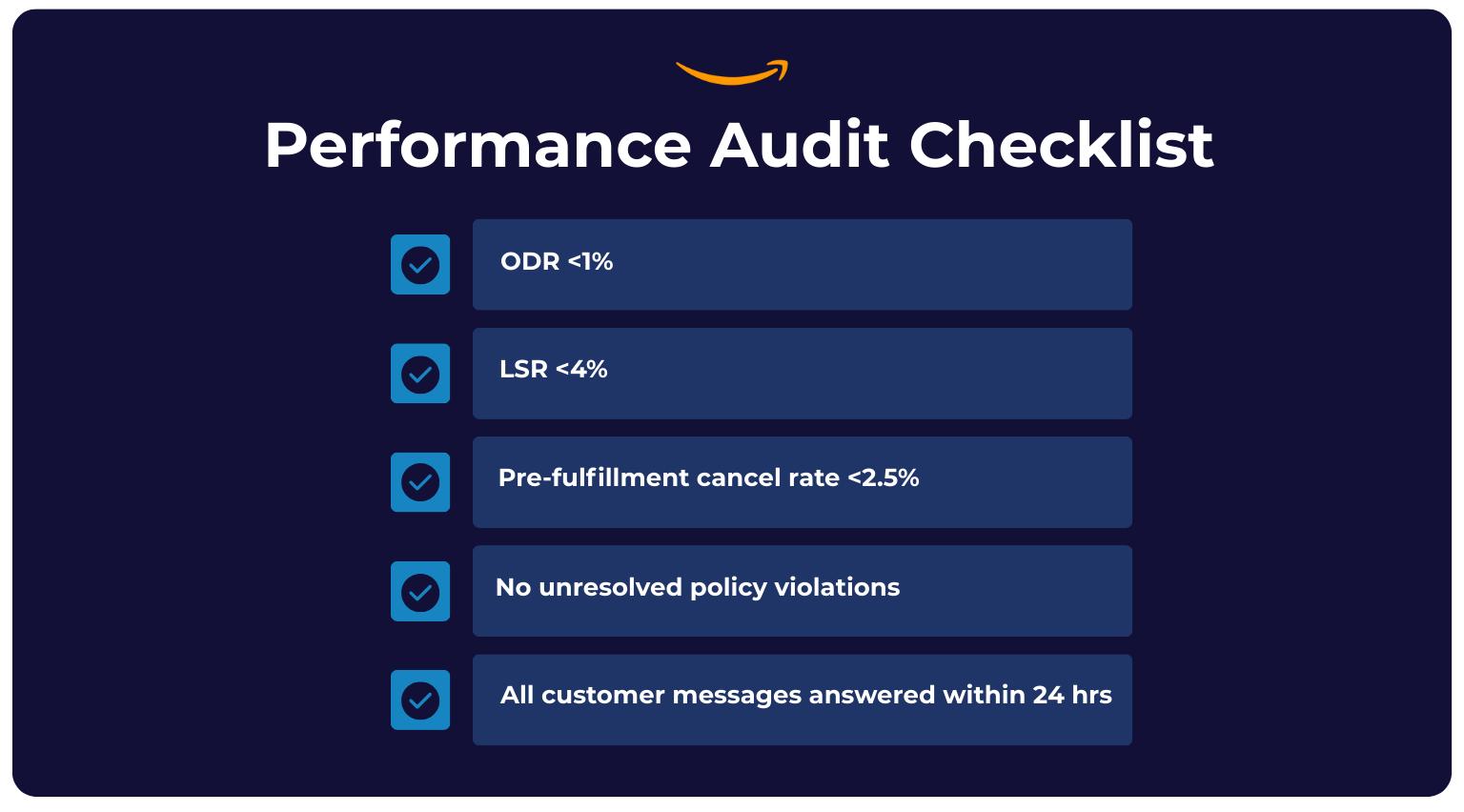
- Order defect rate (ODR). This must stay below 1% to avoid penalties.
- Late shipment rate (LSR). Aim for under 4%.
- Pre-fulfillment cancellation rate. Keep it under 2.5%.
- A-to-Z Guarantee claims, which should be tracked and responded to promptly.
Pro tip: Even one spike in ODR or LSR can impact your Featured Offer eligibility, so set alerts to catch issues before Amazon flags them.
Mobile App for On-the-Go Management
The Amazon Seller app (iOS and Android) lets you:
- Monitor sales and traffic in real time.
- Respond to customer messages within Amazon’s 24-hour service-level agreement (SLA).
- Create and edit listings from your phone.
- Scan barcodes for quick product lookup or listing creation.
- Manage pricing and run limited promotions.
Pro tip: Use push notifications for order updates and performance alerts so you never miss a customer issue.
API Access for Advanced Automation
For high-volume or enterprise-level sellers, the Amazon Marketplace Web Service (MWS) and Selling Partner API (SP-API) offer robust automation options:
- Sync inventory with ERP or warehouse management systems.
- Automate repricing based on competitive data.
- Bulk-update product details across thousands of SKUs.
- Pull performance metrics directly into business intelligence dashboards.
Pro tip: If you’re running more than 1,000 SKUs or multiple marketplaces, API integration is a competitive necessity.
How to Create Amazon Seller Central Product Listings That Convert
Your product listing is the first thing shoppers see, the last thing they read before purchasing, and one of the most critical factors in winning the Featured Offer. Well-optimized listings do more than describe a product. They rank better, convert faster, and tell a compelling story.
“On Amazon, it’s not the best story that wins,” says Steven Pope, aka My Amazon Guy. “It’s the clearest. The most searchable. The fastest to click.”
Here’s how to build listings that stand out in a sea of search results and actually close the sale:
1. Craft Compelling, Keyword-Rich Product Titles
Amazon’s algorithm heavily weights your title for both search visibility and click-through rate. To create an effective product title:
- Follow the recommended format: Brand + Key Feature + Model/Series + Size/Color. For example: “HydroMate 32oz Stainless Steel Water Bottle – Double Wall Insulated – Blue.”
- Include your primary keyword as close to the beginning as possible.
- Avoid keyword stuffing. Use natural, readable language.
- Adhere to category-specific title length limits (often 150-200 characters).
Pro tip: Check search term reports to identify the top-converting keywords for your category and integrate them into your title.
2. Write Benefit-Driven Bullet Points
According to Mina Elias, founder and CEO of Trivium Group:
“If your product isn’t solving a real problem better than anyone else, why should anyone care? Explain to me WHY anyone would want to buy your product instead of your competitor’s? Too many Amazon brands make the mistake of launching products because they look ‘cool’ or seem profitable. Or maybe once upon a time they were actually better. But now they’re not actually solving a problem in a unique way. No superior solution? No sale. Your product NEEDS to be different and better than your competitors if you want to stand out.”
Bullets are prime real estate for conversion-driving copy that highlights how your product is different from the rest. Shoppers often scan these first and skip descriptions entirely.
To write conversion-driving bullet points:
- Lead with benefits; follow with features. For example: “Keeps drinks cold for 24 hours thanks to double-wall vacuum insulation.”
- Include secondary keywords naturally.
- Keep each bullet concise (150-200 characters).
- Use all five bullet slots (or up to 10 for some categories).
- Address pain points and unique selling propositions.
3. Tell a Persuasive Story in the Product Description
The description is your chance to sell the lifestyle, not just the product.
To tell a compelling story in your product description:
- Expand on bullet points with engaging, benefit-led copy.
- Incorporate sensory or emotional language to create a vivid customer experience.
- Break content into short paragraphs for readability.
- Use HTML formatting (where allowed) for bold text and line breaks.
- Weave in your brand story to create connection and loyalty.
4. Optimize Backend Keywords for Search Discoverability
Backend keywords are invisible to shoppers but indexed by Amazon’s search engine.
To leverage backend keywords effectively:
- Include synonyms, alternate spellings, and relevant long-tail keywords.
- Avoid repeating words from your title or bullets. Amazon already indexes those.
- Use all available character space (often 250 bytes per field).
- Don’t include competitor brand names or prohibited terms.
Pro tip: Tools like Helium 10 and Jungle Scout can help identify high-volume keywords competitors are ranking for that you might be missing.
5. Use High-Quality, Conversion-Focused Visuals
Images are often the deciding factor in whether a shopper clicks or bounces.
To enhance your listings with high-quality visuals:
- Make sure your main image has a white background and is high-res (at least 1,600 pixels for zoom).
- Use secondary images that show features, packaging, and lifestyle use.
- Create infographics that highlight dimensions, benefits, and product comparisons.
- Include 360-degree views or product-in-action shots if your category supports them.
Pro tip: Test image sequences using Amazon’s Manage Your Experiments A/B tool to see which layouts convert best.
6. Leverage A+ Content
If you’re enrolled in Amazon Brand Registry, A+ Content is a must for boosting conversions.
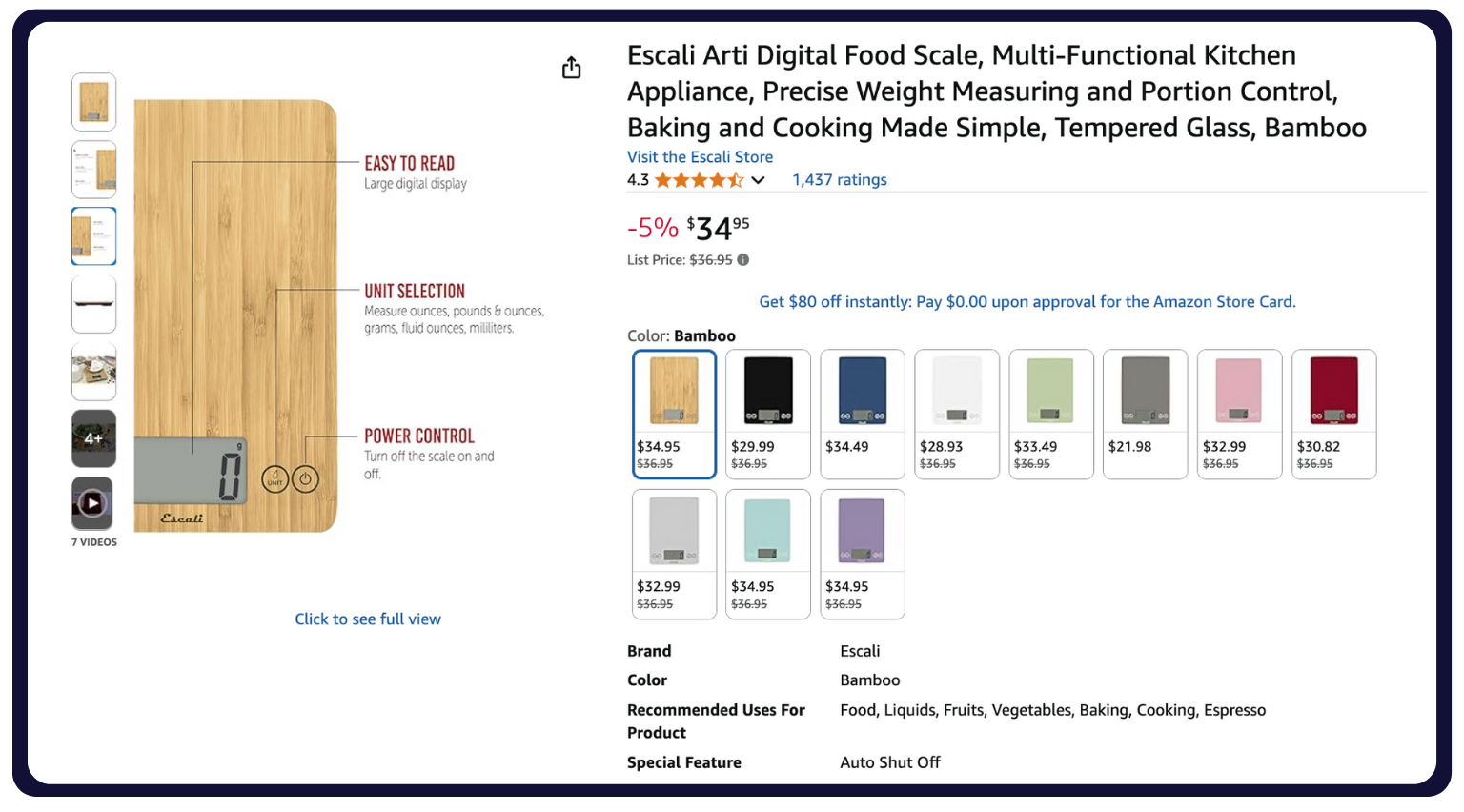
The benefits of A+ Content include:
- Rich media modules (images, comparison charts, and video).
- The ability to tell your brand story with more design flexibility.
- Increased shopper engagement and trust.
- Improved cross-selling with product comparison tables.
According to Amazon, Basic A+ Content can boost sales by up to 8% and Premium A+ Content can increase sales by up to 20%.
Pro tip: If you’re a visual learner, step-by-step YouTube tutorials from experienced Amazon sellers can be a goldmine. Many creators walk through real listing optimizations, keyword research, and A+ Content setup, which can make it easier to apply best practices directly in your own account.
How to Optimize Amazon Listings for Voice Search
With over 70 million U.S. households using Alexa-enabled devices, voice commerce is no longer a futuristic trend. It’s here now. Amazon promotes shopping via Alexa, which means optimizing your listings for voice queries can give you an edge in discoverability.
Best Practices for Voice Search Optimization
- Use natural language. Shoppers don’t say, “Insulated stainless steel hydration vessel.” They say, “Water bottle that keeps drinks cold.” Favor conversational phrasing in your titles and bullets.
- Shorten product titles. Alexa truncates long titles. Keep key details upfront: Brand + Product Type + Top Benefit.
- Answer questions in your copy. Voice searches often start with “what,” “how,” or “best.” Incorporate FAQ-style phrases in descriptions and A+ Content.
- Target long-tail keywords. Voice queries are longer and more specific than typed searches. Use backend keywords to capture phrases like “best water bottle for hiking” or “eco-friendly yoga mat.”
- Leverage reviews. Alexa sometimes references customer reviews when suggesting products. Encourage authentic reviews that highlight benefits in natural language.
Pro tip: Track search term reports for longer, question-based queries. These are strong indicators of voice search activity in your category.
Inventory and Fulfillment: Choosing Between FBA, FBM, and SFP
Your fulfillment strategy directly impacts Featured Offer eligibility, customer satisfaction, and profit margins. In Amazon Seller Central, you have three main fulfillment options, each with distinct benefits, trade-offs, and operational demands.
Fulfillment by Amazon (FBA)
How FBA Works:
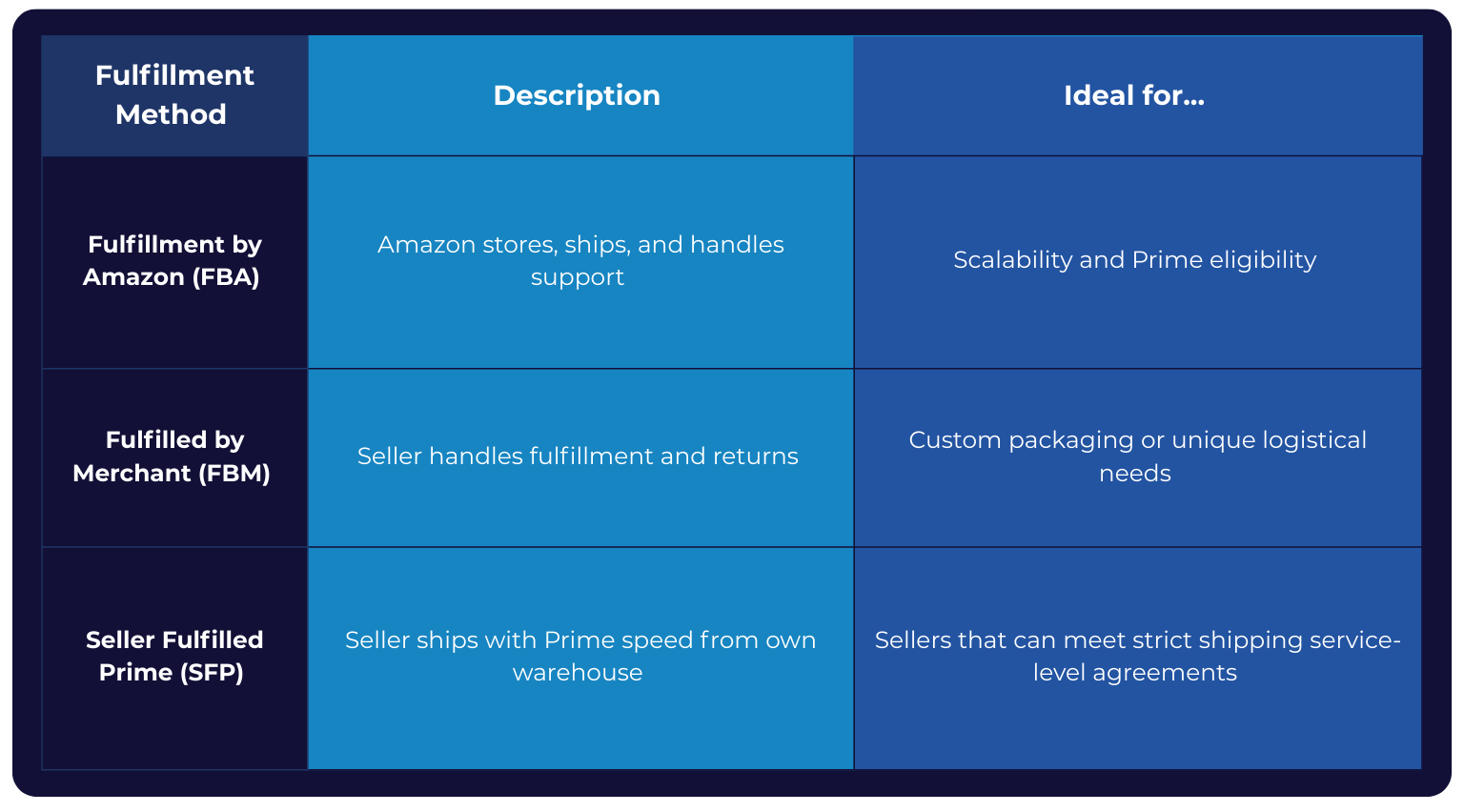

You send your products to Amazon’s fulfillment centers. Amazon handles storage, picking, packing, shipping, customer service, and returns.
Benefits of FBA:
- Instant Prime eligibility for your products.
- Higher visibility in search results.
- Reduced operational workload.
- Access to Amazon’s customer service and A-to-Z Guarantee.
FBA Is Best For:
- Sellers looking to scale quickly without building their own logistics network.
- Products with high sales velocity and predictable demand.
- Sellers aiming to boost Featured Offer win rates through Prime advantages.
FBA Considerations:
- Storage and fulfillment fees can cut into margins, especially for oversized or slow-moving items.
- You have less control over packaging and the unboxing experience.
Fulfilled by Merchant (FBM)
How FBM Works:
You list on Amazon but manage storage, order processing, shipping, and customer service yourself (or via a 3PL).
Benefits of FBM:
- Full control over packaging, inserts, and brand presentation.
- Lower fees if you already have an efficient fulfillment setup.
- Flexibility to sell oversized or heavy products without high FBA costs.
FBM Is Best For:
- Sellers with unique packaging or fragile products.
- Low-volume or seasonal sellers avoiding long-term FBA fees.
- Businesses already running their own fulfillment operations.
FBM Considerations:
- There’s no automatic Prime badge (unless using SFP).
- You must meet Amazon’s delivery performance standards to remain competitive.
Seller Fulfilled Prime (SFP)
How SFP Works:
You fulfill orders from your own warehouse but still qualify for the Prime badge by meeting Amazon’s strict shipping performance standards.
Benefits of SFP:
- Prime badge visibility without FBA fees.
- Full control over packaging and shipping experience.
- Ability to fulfill from your own inventory hubs.
SFP Is Best For:
- Sellers with highly efficient logistics and nationwide coverage.
- High-margin products where FBA fees erode profitability.
- Businesses wanting to maintain Prime status but avoid Amazon storage.
SFP Considerations:
- SFP enrollment is competitive and often capped.
- Service-level agreements are strict:
- 99% on-time shipping rate.
- 2-day nationwide delivery coverage.
- Low order cancellation rates.
Tools to Stay Ahead of Demand
No matter which model you choose, inventory management is critical for avoiding stockouts (which kill Featured Offer eligibility) and overstocking (which eats into margins).
Must-Use Seller Central Tools:
- Restock Inventory Tool forecasts replenishment needs based on sales velocity.
- Automated Replenishment automatically generates FBA replenishment orders.
- Multi-Channel Fulfillment allows you to use Amazon’s network to fulfill orders from your own site, eBay, Shopify, or other channels.
Pro tip: Monitor inventory performance index (IPI) in your Seller Central dashboard. A low score can lead to storage restrictions, especially during Q4.
How to Create a Shipping Plan in Seller Central
Shipping inventory to Amazon’s fulfillment centers is a precision operation that directly affects your inventory health, delivery times, and customer satisfaction. Done right, your products will be ready for Prime shipping in days. Done wrong, you risk delays, extra fees, and even inventory refusals.
Here’s how to build and execute a shipping plan inside Amazon Seller Central:
1. Create Your FBA Shipment
Where to Start:
- Navigate to the “Inventory” tab in Seller Central.
- Select the SKUs you want to send and click “Send/Replenish Inventory.”
- Confirm your ship-from address (warehouse, prep center, or home base).
- Select FBA as the fulfillment method if not already assigned.
Pro tip: Group products by similar prep requirements to streamline the labeling and packing process.
2. Label Your Products
Amazon uses barcodes to track inventory. You have two options:
- Amazon barcode (FNSKU): This is required for unique product tracking. Each unit needs a label unless commingling is enabled.
- Commingled inventory (manufacturer barcode): Amazon mixes your products with identical items from other sellers. This speeds up processing but removes inventory-level control.
Labeling Best Practices:
- Labels must be scannable and placed on a flat, visible surface.
- Avoid placing labels over seams, curves, or shrink wrap wrinkles.
- Use a thermal printer for speed and durability.
3. Package Products for Safe Transit
Amazon has strict prep requirements to prevent damage during storage and shipping.
Packaging Guidelines by Product Type:
- Fragile items: Bubble wrap or foam, “fragile” sticker required.
- Liquids: Leak-proof packaging and poly bags with secure seals.
- Apparel: Poly bags with suffocation warning labels.
- Sharp items: Blade guards or protective casing.
- Small parts: Poly bags to prevent loss during handling.
Pro tip: Always review Amazon’s FBA prep requirements before sending. Violations can result in costly unplanned service fees.
4. Provide Box Content Information
Amazon requires accurate box-level details for faster check-in and reduced receiving delays.
- Enter the quantity and SKUs for each box.
- Use Amazon’s 2D barcode option to simplify content identification.
- If sending pallets, follow FBA pallet requirements for stacking, wrapping, and labeling.
5. Select Your Carrier and Ship
Amazon’s Partnered Carrier Program often offers deeply discounted shipping rates through UPS, FedEx, or LTL (less-than-truckload) freight.
Carrier Selection Tips:
- Small parcel delivery (SPD) is best for lightweight, individual boxes.
- LTL or full-truckload (FTL) freight is best for large shipments on pallets.
- Compare Amazon’s partnered rates with your own negotiated carrier rates. Sometimes your own account wins.
6. Track Your Shipment
Once shipped, monitor delivery from your shipping queue in Seller Central.
- In transit: Carrier has picked up the shipment.
- Delivered: The shipment has arrived at the fulfillment center dock.
- Checked in: Inventory has been received and is in processing.
- Available: Items are live and available for sale.
Pro tip: Delays in check-in can occur during peak seasons. Plan to send inventory at least three or four weeks before major sales events (e.g., Prime Day or Q4 holidays).
How to Monitor Seller Central Performance and Account Health
Amazon doesn’t just judge sellers on sales volume. It evaluates how well you fulfill orders, resolve customer issues, and comply with policies. Your Account Health is essentially your seller credit score. If it drops too low, your listings can be suppressed or your account suspended, even if you’re selling well.
Here’s how you can keep tabs on your performance:
Keep Your Order Defect Rate (ODR) Under 1%
ODR measures the percentage of orders with major problems, including:
- Negative feedback.
- A-to-Z Guarantee claims.
- Chargebacks.
It’s a direct signal to Amazon of customer dissatisfaction. Exceeding 1% is a red flag that can trigger account reviews or suspensions.
To improve your ODR:
- Ship on time and use reliable carriers.
- Respond to customer inquiries within 24 hours.
- Resolve complaints proactively before they escalate to claims.
Target 4% Late Shipment Rate (LSR) or Lower
LSR measures the percentage of orders confirmed shipped after the expected ship date. It matters because late shipments damage customer trust and reduce your Featured Offer eligibility.
To improve your LSR:
- Maintain buffer inventory in FBA for high-demand items.
- Set realistic handling times in FBM settings.
- Use Amazon’s Buy Shipping tool for tracking integration and faster updates.
Keep Your Pre-Fulfillment Cancellation Rate Below 2.5%
Pre-fulfillment cancellation rate measures the percentage of orders you cancel before confirming shipment. High cancellation rates signal poor inventory management and can lead to account penalties.
To improve your pre-fulfillment cancellation rate:
- Keep inventory synced across sales channels.
- Use the Restock Inventory tool to avoid stockouts.
- Remove inactive SKUs from active listings to prevent accidental sales.
Monitor Compliance in the Account Health Dashboard
To find your Account Health dashboard, start at the main Seller Central navigation, and then go to “Performance → Account Health.”
This dashboard shows:
- Your ODR, LSR, and cancellation rates.
- Policy compliance status (product authenticity, safety, and restricted products).
- Intellectual property complaints.
- Any active violations or warnings.
Check your dashboard daily, not just when you get a warning email. Set up push notifications via the Seller app for urgent performance alerts. And address any violations immediately to prevent listing suppression.
The Stakes of Poor Account Health
If you exceed performance thresholds or accumulate multiple violations, Amazon can:
- Suspend individual listings.
- Remove your Featured Offer eligibility.
- Freeze your account pending a plan of action.
- Permanently ban your seller account in severe cases.
Quick Seller Central Performance Audit Checklist
Pro tip: For deeper insights and peer-tested strategies, consider joining LinkedIn groups for Amazon sellers or following industry content like the SmartScout Blog, which regularly breaks down algorithm shifts and account health best practices.
Advertising on Amazon: Sponsored Ads, Deals, Experiments, and DSP
Amazon is more than a marketplace. It’s a pay-to-play retail media giant. In 2024, Amazon’s ad revenue topped $56 billion, which makes it one of the fastest-growing digital ad platforms in the world. The competition is fierce, but the targeting, intent, and ROI potential are unmatched.
Here’s how to leverage Amazon’s advertising and promotional tools to stand out, win the Featured Offer more often, and scale sales profitably.
Sponsored Products: The Core Revenue Driver
Sponsored Products ads are cost-per-click (CPC) ads that promote individual product listings. They appear in shopping results and on product detail pages.
Use Sponsored Products when you’re:
- Launching new products to drive early visibility and sales velocity.
- Defending your own brand listings from competitor ads.
- Targeting high-intent keywords for direct conversions.
Start with automatic campaigns to discover converting keywords, and then switch to manual targeting for optimization. Use exact match for high-converting terms and broad match for discovery. And monitor advertising cost of sales (ACOS) and adjust bids to maintain profitability.
Sponsored Brands: Own the Top of Search
Sponsored Brands ads are custom banner advertisements that feature your brand logo, headline, and multiple products. They offer prime real estate at the top of search results.
Use Sponsored Brands for:
- Boosting brand awareness.
- Cross-selling related products.
- Protecting your branded keyword space.
Use compelling, keyword-relevant headlines that highlight your USP. Direct clicks to a Brand Store for a curated shopping experience. And test video ad formats to increase engagement (often lower CPC than static Sponsored Brands ads).
Sponsored Display: Retarget and Conquer
Sponsored Display ads appear on Amazon and across its network of third-party sites and apps. They target shoppers who have viewed your products or similar ones.
Use Sponsored Display ads for:
- Retargeting shoppers who didn’t purchase.
- Targeting competitor product pages.
- Reengaging past customers.
Combine Sponsored Display with coupons or limited-time deals to close sales faster. Monitor new-to-brand (NTB) metrics to track customer acquisition vs. repeat purchases.
Deals and Promotions: Trigger Urgency
The options for deals and promotions include the following:
- Coupons are discount badges that appear in search and on product pages.
- Lightning Deals are limited-time, high-visibility promotions featured on Amazon’s deals page.
- Best Deals are longer-running promotions with flexible discounts.
Use deals to boost sales velocity before Prime Day, Q4 holidays, or other major shopping events. Pair promotions with ad campaigns for maximum visibility and conversion lift.
Manage Your Experiments: Test and Optimize
Manage Your Experiments (MYE) is Amazon’s native A/B-testing tool that lets you run split tests on:
- Titles.
- Main images.
- A+ Content modules.
Data-backed creative changes can lift click-through rates and conversions without increasing ad spend.
Run tests for at least four to six weeks to reach statistical significance. And be sure to only test one element at a time so you can isolate results.
Amazon DSP: Programmatic, Audience-Based Advertising
Amazon DSP (Demand-Side Platform) allows brands to programmatically buy display, video, and audio ads both on Amazon-owned properties (like IMDb, Fire TV, and Twitch) and across third-party websites and apps. Unlike Sponsored Ads, DSP campaigns aren’t keyword-based; they’re audience-driven.
With DSP, you can:
- Reach shoppers both on and off Amazon, including those who browsed your product but didn’t buy.
- Access advanced audience segments like in-market shoppers, lifestyle profiles, and lookalike audiences.
- Run video ads across Amazon Streaming TV (OTT) for high-visibility branding campaigns.
- Use retargeting to reengage lapsed or cart-abandoning customers.
DSP is best for brands with larger budgets (often $10,000 or more per month) that want to expand beyond Sponsored Ads and build brand awareness alongside conversions.
Amazon Ads Console: Your Campaign Command Center
The Amazon Ads Console is where you:
- Build and manage campaigns across ad types.
- Access advanced targeting, reporting, and bid controls.
- Monitor performance via metrics like ACOS, total advertising cost of sales (TACOS), and return on ad spend (ROAS.)
Use dayparting strategies to bid higher during peak shopping hours. And analyze search term reports weekly to add negative keywords and avoid wasted spend.
Tools to Supercharge Your Ad ROI
Maximizing the return on your Amazon ad spend is about using the right tools to track, optimize, and scale your ads. From measuring the true impact of off-Amazon traffic to automating bids with AI, these solutions give you the insights and efficiencies needed to stretch every ad dollar further and accelerate sales growth.
- Amazon Attribution: Measure the impact of off-Amazon traffic on your Amazon sales, and pinpoint which external channels, from Google Ads to influencer posts, are actually driving conversions on Amazon so you can double down on what works.
- Promotions Manager: Centralize and track promotions for better coordination. Align deals, coupons, and discounts with your ad campaigns to boost conversion rates and create urgency without overspending or overlapping offers.
- Helium 10 Adtomic: Leverage AI-powered bid automation and keyword optimization. Save hours of manual work by using AI to adjust bids, target high-performing keywords, and cut wasteful spend so your ads stay profitable at scale.
Amazon Seller Central Analytics and Reporting
Your Amazon business is only as strong as the data you use to run it. Seller Central’s analytics and reporting tools not only tell you what happened, but also reveal why it happened and how to improve. From tracking day-to-day performance to spotting new market opportunities, here’s how to leverage each reporting tool for maximum impact.
Business Reports
Business reports allow you to track sales, orders, sessions (traffic), and conversion rates for your ASINs over custom date ranges.

This empowers you to:
- Identify your top-performing products by conversion rate, not just sales volume.
- Spot seasonal trends and adjust pricing or ad spend.
- Compare sessions vs. sales to diagnose listing optimization issues.
Pro tip: Monitor unit session percentage. If traffic is strong but conversions are low, your listing copy, images, or pricing likely need work.
Brand Analytics
Brand Analytics provides insight into market share, customer demographics, repeat purchase rates, and Amazon search query performance.
If you’re enrolled in Brand Registry, you can leverage Brand Analytics to:
- See which keywords drive the most clicks and conversions in your niche.
- Track how often customers buy from you again, which is a key loyalty metric.
- Identify competitors winning traffic on your brand terms and defend with targeted ads.
Pro tip: Use demographic data to fine-tune creative (e.g., adjust ad imagery based on the age or gender profile of your top buyers).
Product Opportunity Explorer
Product Opportunity Explorer highlights high-demand, low-competition product niches based on Amazon’s own shopping data.
You can use Product Opportunity Explorer to:
- Uncover new SKUs to launch with built-in demand.
- Validate ideas before investing in production.
- Benchmark competitors’ average price points and review ratings.
Pro tip: Cross-reference Opportunity Explorer results with keyword search volume in Helium 10 to ensure sustained demand.
Search Term Reports
These reports show actual customer search terms that triggered your ads and the resulting clicks, orders, and ACOS.
Search term reports allow you to:
- Identify high-converting keywords to add to listings.
- Spot irrelevant terms and add them as negative keywords to save ad spend.
- Understand search behavior trends over time.
Pro tip: Refresh backend keywords monthly based on search term report insights to capture seasonal and trending phrases.
Restock Planning Reports
These reports forecast replenishment needs based on recent sales velocity and Amazon’s inventory capacity limits.
Restock planning allows you to:
- Prevent Featured Offer losses from going out of stock.
- Reduce excess inventory to avoid long-term storage fees.
- Keep your inventory performance index (IPI) score high to avoid storage restrictions.
Pro tip: Send inventory three or four weeks before seasonal peaks or Prime events. Amazon’s check-in times can double during Q4.
Payment Reports
These reports track all sales, returns, refunds, and disbursements in detail.
With payment reports, you can:
- Reconcile sales with your accounting system.
- Verify Amazon’s fee deductions for accuracy.
- Track refund trends to catch product or listing issues early.
Pro tip: If returns spike on a specific SKU, pull customer feedback from the report and address the root cause before it impacts ODR.
How to Handle Customer Service and Communication
On Amazon, customer service is a performance metric that directly impacts your Account Health, Featured Offer eligibility, and long-term sales growth. Shoppers expect fast, helpful responses and a seamless resolution process. Amazon expects strict compliance with its policies.
Here’s how to handle communication like a pro while staying 100% compliant:
Buyer-Seller Messaging Service
The Buyer-Seller Messaging Service is a secure, Amazon-monitored channel for communicating with customers post-purchase.
Key Rules You Must Follow:
- No using marketing language, upselling, or including links to external websites.
- No requesting positive reviews. Only neutral review requests are allowed.
- You must respond to all customer inquiries within 24 hours (including weekends and holidays).
Buyer-Seller Messaging Service Best Practices:
- Use polite, concise, and solution-focused language.
- Save templated responses for common questions (e.g., “Where is my order?”).
- Access Buyer-Seller Messaging via Orders → Manage Orders → Contact Buyer in Seller Central.
Refunds and Returns
If you’re using FBA, Amazon handles returns automatically, issues refunds to customers, and restocks sellable inventory without your involvement.
If you’re using FBM, clearly state your return policy in Seller Central, process returns and refunds within two business days of receiving the item, and provide prepaid return labels when required by Amazon’s return policy.
Pro tip: Track return reasons in your returns report. Frequent “item not as described” flags can indicate listing optimization issues.
Soliciting Reviews the Right Way
Customer reviews drive conversion and influence Amazon’s ranking algorithm, but review solicitation is heavily regulated.
Compliant Review Request Options:
- The “Request a Review” button in Seller Central, which sends an Amazon-approved, non-editable message.
- Automated review request tools like Jungle Scout Review Automation.
Pro tip: Send review requests five to 10 days after delivery for the best response rates: early enough for the product to be top of mind but late enough for the customer to have used it.
Handling Negative Feedback
Low feedback scores hurt your credibility and your Featured Offer chances.
To handle negative feedback:
- Respond promptly. Acknowledge the issue within 24 hours.
- Resolve the problem. Offer refunds, replacements, or troubleshooting.
- Request removal. If the feedback violates Amazon’s policy (e.g., it’s about FBA shipping or is abusive), open a case in Seller Support to have it removed.
The Stakes of Poor Service
Failing to meet Amazon’s customer service standards can lead to:
- Account Health warnings or suspension.
- Loss of Featured Offer eligibility.
- Long-term damage to your seller reputation.
- Increased A-to-Z Guarantee claims.
How Play by Amazon’s Rules and Stay Compliant
On Amazon, compliance isn’t optional. One violation can suppress a top-selling listing. Multiple violations can take down your entire account. The good news is that most compliance issues are preventable if you know the rules, monitor your Account Health, and act fast when problems arise.
Product Compliance
Amazon enforces strict category-specific requirements for product safety, authenticity, and labeling. Non-compliance can lead to listing removal, inventory disposal, or even permanent account closure.
To meet product compliance requirements, implement a few best practices:
- Use the Manage Your Compliance dashboard to monitor compliance, receive documentation requests, and review your category’s compliance checklist.
- Keep certificates of authenticity, safety test reports, or regulatory approvals on file.
- Stay ahead of changes. Amazon updates compliance requirements regularly, especially in categories like supplements, electronics, and toys.
Fair Pricing Policy
Amazon prohibits pricing that misleads customers or creates an uncompetitive marketplace.
Fair Pricing Policy violations include:
- Pricing higher on Amazon than on your other sales channels.
- Sudden, unexplained price hikes.
- Manipulating list prices to exaggerate discounts.
To make sure you’re pricing your products effectively and remaining compliant:
- Monitor your listings with automated repricing tools to avoid unintended spikes.
- Align with your brand’s minimum advertised price (MAP) policy while staying competitive in the Featured Offer.
- Keep shipping costs reasonable. Inflated shipping can also trigger violations.
For brands, this isn’t just about Amazon’s algorithms; it’s also about enforcing the minimum advertised price (MAP) across resellers. If one seller undercuts MAP, Amazon may lower the Featured Offer price across the board, which erodes margins for everyone. Proactively monitoring MAP violations with tools like ChannelAdvisor or PriceSpider helps you stay compliant while protecting profitability.
If Amazon detects “fair pricing” issues, they may suppress your Featured Offer or remove your offer entirely, even without warning.
Suspension Protocols
If you violate Amazon policies, Amazon sends a performance notification explaining the violation or risk. You’ll often have a short window to respond before they take action.
Here’s your action plan:
- Review the violation details immediately in the Account Health dashboard.
- Draft a plan of action (POA) with three parts:
- Root cause: What caused the issue.
- Immediate correction: How you fixed it.
- Preventive measures: How you’ll prevent it from happening again
- Submit the POA promptly through Seller Central.
Pro tip: Keep your tone factual and professional. Avoid blaming Amazon or customers. Amazon wants evidence you can prevent future violations, not excuses.
Selling Internationally With Amazon Global Selling
Why limit your sales to one country when Amazon gives you the infrastructure to reach customers across the globe? Amazon Global Selling allows you to expand into dozens of international marketplaces, tap into new buyer segments, and scale without building your own cross-border logistics network.
Expand Beyond the U.S.
With one Seller Central account, you can apply to sell in regions including:
- Europe: the U.K., Germany, France, Italy, Spain, the Netherlands, Poland, and Sweden.
- Asia-Pacific: Japan, Australia, and Singapore.
- North America: Canada and Mexico.
- Middle East: United Arab Emirates and Saudi Arabia.
Selling internationally allows you to diversify revenue, capitalize on seasonal demand differences, and gain brand recognition in new markets.
Pro tip: Research each marketplace’s category restrictions and local competition before listing. What sells well in the U.S. might not translate directly in other countries.
Manage Currency Seamlessly With Amazon Currency Converter
With Amazon Currency Converter, Amazon automatically converts your foreign sales revenue into your home currency and deposits it into your linked bank account.
This has a few key benefits:
- There’s no need to open local bank accounts in each country.
- Conversion rates are visible in right in Seller Central.
- Payouts are faster than third-party services.
Pro tip: Track conversion fees. If you’re selling at high volumes internationally, a dedicated multicurrency account or payment provider might offer better rates.
Localize Your Listings for Higher Conversions
Shoppers trust sellers that speak their language, both literally and culturally.
There are a few best practices you can implement to localize your listings:
- Translate listings using native speakers or professional localization services. Avoid machine translation alone.
- Adapt measurements, sizing charts, and keywords to local standards.
- Ensure compliance with local labeling and safety regulations.
For example, a U.S. “queen size” bed listing should be converted to the correct regional equivalent in the U.K. (often “king”) and metric dimensions.
Leverage Amazon’s Global Logistics for Cross-Border Shipping
With FBA Export or Pan-European FBA, Amazon stores your inventory in strategic fulfillment centers and delivers orders to customers across multiple countries.
The benefits of these programs include:
- Prime eligibility in international markets.
- Faster delivery times without customs delays for buyers.
- Reduced complexity in managing import/export paperwork.
Pro tip: Understand tax implications. You might need to register for value-added tax or general consumption tax in certain countries before shipping inventory there.
Common Pitfalls in International Selling
International selling is beneficial, but it’s not without risk. As you wade into international waters, make sure you avoid the pitfalls of international selling, including:
- Ignoring local regulations, which can result in product bans or fines.
- Overlooking seasonality shifts (e.g., holiday seasons differ by region).
- Failing to factor in international return policies and costs.
- Using the same pricing strategy across all regions without adjusting for currency fluctuations and local buying power.
Amazon Global Selling is one of the fastest ways to multiply your brand’s reach and revenue. The key to success is market research, proper localization, and leveraging Amazon’s fulfillment network to keep operations efficient and customer experience seamless, no matter where in the world your buyers are.
Amazon Seller Central Frequently Asked Questions
What’s the best way to win the Featured Offer (formerly Buy Box)?
The Featured Offer (formerly Buy Box) drives more than 80% of Amazon sales, so winning it can make or break your revenue. To maximize your chances:
- Keep pricing competitive on Amazon and compared to other online channels.
- Use Fulfillment by Amazon (FBA) or Seller-Fulfilled Prime (SFP) for Prime eligibility and fast delivery.
- Maintain a low order defect rate (under 1%) and late shipment rate (under 4%).
- Keep inventory in stock. Running out hurts both Feautred Offer share and organic ranking.
- Respond to customer inquiries within 24 hours to keep your seller rating high.
How much does it cost to sell on Seller Central?
For most serious sellers, the Professional plan is the way to go:
- $39.99/month subscription fee (regardless of sales volume).
- Referral fees of 8%-15% depending on category.
- Additional fees for FBA (storage, fulfillment, and removal orders) if used.
- Optional advertising spend for Sponsored Products, Sponsored Brands, or Sponsored Display ads.
For example, if you sell a $50 product in a category with a 15% referral fee, Amazon takes $7.50 and any applicable FBA fees.
What’s the difference between FBA and FBM?
- Fulfillment by Amazon (FBA): You send inventory to Amazon warehouses. They handle storage, picking, packing, shipping, and customer service. The Prime badge is included automatically. FBA is best for fast-scaling, Prime-eligible sales and operational simplicity.
- Fulfilled by Merchant (FBM): You store and ship products yourself or through a 3PL, and you handle all customer service and returns. FBM works for oversized, seasonal, or custom-packaged items where you need control and lower storage costs.
Is Amazon Seller Central right for my startup?
Yes, it might be! Seller Central is ideal for direct-to-consumer (DTC) brands that want immediate access to Amazon’s massive customer base without building their own e-commerce infrastructure. You can:
- Start selling within days of registration.
- Test new products quickly.
- Use FBA to handle fulfillment while focusing on marketing and brand-building.
Many successful Amazon-native brands start on Seller Central and then expand to their own Shopify store once they’ve validated demand.
How do I track performance on Amazon?
Seller Central offers a suite of analytics and reporting tools:
- Business reports: Track sales, traffic, and conversion rates by ASIN.
- Brand Analytics (Brand Registry required): View customer demographics, search term performance, and market share.
- Account Health dashboard: Monitor compliance metrics like ODR, LSR, and cancellation rates.
Review your data weekly to catch downward trends early, and adjust listings, ads, or pricing before they impact your ranking or Featured Offer share.
What is the Amazon Inventory Performance Index (IPI), and why does it matter?
The IPI score measures how efficiently you manage your FBA inventory. It considers factors like:
- Excess inventory.
- Sell-through rate.
- In-stock rate for popular products.
- Stranded inventory (inactive listings with stock).
A low IPI score can trigger FBA storage limits and higher long-term storage fees. Keep your score above Amazon’s quarterly threshold (often 400+) to avoid restrictions.
How can I improve my product ranking on Amazon?
Ranking is driven by sales velocity, keyword relevance, and listing quality. To improve:
- Optimize titles, bullets, descriptions, and backend keywords for top search terms.
- Drive early sales velocity with Amazon PPC campaigns.
- Maintain high conversion rates through compelling images and A+ Content.
- Keep products in stock. Going out of stock resets ranking momentum.
Use the Search Query Performance report in Brand Analytics to see which keywords you’re ranking for and where you can gain ground.
Master Seller Central, Master Amazon
Amazon Seller Central is so much more than a dashboard. It’s your gateway to a global marketplace that drives over 60% of Amazon’s total retail sales through independent sellers. While the platform provides the infrastructure, data, and audience, the real competitive advantage comes from how you use it.
You’ve now seen how to:
- Set up and optimize your Seller Central account for long-term scalability.
- Build listings that convert and rank in Amazon search.
- Choose fulfillment methods that balance cost, speed, and Prime eligibility.
- Use ads, promotions, and A/B testing to accelerate sales velocity.
- Monitor account health to protect your Featured Offer status.
- Expand internationally without losing brand control.
- And more!
The most successful sellers are the ones who treat Amazon like a business, not just a sales channel. They optimize every listing, run data-driven campaigns, and constantly adapt to Amazon’s evolving algorithms and policies.
If you take the strategies in this guide and apply them consistently, you’ll have the foundation to scale profitably, expand into new markets, and build a brand that thrives both on and off Amazon.
Your next step: Open your Seller Central dashboard today, run an honest performance audit, and start implementing at least one improvement from each section of this guide. Small, consistent optimizations compound, and that’s how Amazon’s most successful sellers win.
Ready to Stop Guessing and Start Growing?
Let’s build a digital marketing program that aligns with your revenue goals and strengthens your bottom line.